 Crypto
 StackHQ
 Chest Manager
Questions, answered
TBCounter is independent and is not affiliated with, endorsed by, or approved by Scorewarrior or Total Battle.
About TBCounter
What is TBCounter?
TBCounter is an app for Total Battle players, for Windows and Android. Crypto explores your crypts for you. StackHQ works out your best troop stack, puts the troops into the game and clears your Temple. It is one subscription, $19 a month, with a 7-day free trial.
Is TBCounter affiliated with Scorewarrior or Total Battle?
No. TBCounter is independent and is not affiliated with, endorsed by, or approved by Scorewarrior or Total Battle. It is built and maintained by players, for players.
Does using TBCounter carry account risk?
TBCounter is an independent third-party tool that automates in-game actions, and it may carry account risk. You are responsible for reading the game terms and deciding whether to use it.
Which game languages does it work with?
The app reads the game in all 18 of its languages.
Installing on Windows
What do I need?
A Windows PC on which you play Total Battle, and a TBCounter subscription or trial.
Where do I download the Windows app?
From your account. Sign in on tbcounter.com and open Account: the Windows download is there for every account with a subscription or a trial.
How do I sign in to the app?
With the license key from your welcome email. You enter it once, the first time you open the app.
How does the app update?
The app checks for a new version when it starts and updates itself.
Installing on Android
Where do I get the Android app?
From your account, not from Google Play. Sign in on tbcounter.com on your phone and open Account: the Android download is there for every account with a subscription or a trial.
My phone shows warnings when I install it. What do I do?
Android asks for extra confirmation for any app that does not come from Google Play. The Android install guide shows each message your phone can show and what to choose.
Do I need a second subscription for my phone?
No. One subscription covers the Windows app and the Android app.
Using the app
What does Crypto do?
It explores crypts for you: it finds the crypts you chose, sends your captains, uses your speedups and collects the chests. The Crypto page shows a run step by step.
What does StackHQ do?
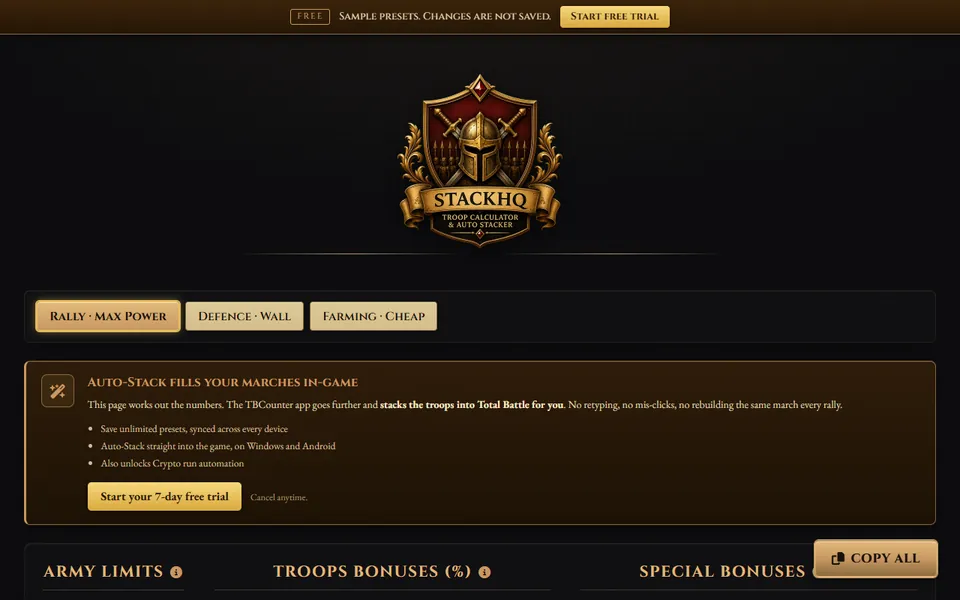
Three things. The Troop Calculator works out the best troop numbers from your own bonuses. Auto Stacker types those numbers into the game. Kill Troops clears every squad out of your Temple. The StackHQ page explains each one.
How accurate is the Troop Calculator?
The calculator reflects your inputs and the values the game shows. It helps planning. It does not promise a battle outcome, because your inputs and game changes affect the actual result.
What happens when Total Battle updates?
When a game update changes a screen the app works with, the app pauses the affected routine and tells you. The fix comes as a normal app update, at no extra cost.
Do my StackHQ presets follow me?
Yes. Presets sync between the Windows app, the Android app and the browser version.
Subscription and payment
How much does TBCounter cost?
$19 a month. One subscription covers Crypto and StackHQ, on Windows and on Android.
How does the 7-day free trial work?
You get full access for 7 days before billing begins. Cancel any time during the trial and you are not charged.
How can I pay?
By card, through Stripe, or with PayPal. Card details never touch TBCounter servers.
How do I cancel?
From your account, at any time. You keep access until the end of the period you paid for, and there is no cancellation fee.
Do you offer refunds?
The 7-day free trial is the time to evaluate the app. Outside the trial, refund requests are reviewed case by case. The full policy is on the Terms page.
My payment failed. What happens now?
Your access is paused and the payment is tried again automatically. To fix it sooner, update your payment method in your account under Billing, then press Retry now.
How do I change my payment method?
For a card: in your account, open Billing and choose Update payment method. For PayPal: change it in your PayPal account.
How do I move the app to another PC?
In your account, open Subscriptions and move TBCounter to another computer. That unlinks the PC it is on now, so you can sign in and activate on the new one.
How do I start my subscription again?
In your account, open Subscriptions. A subscription you cancelled that has not run out yet can be reactivated there, with no new charge that day. One that has ended is started again from the checkout button on that page. The free trial is once per person.
Accounts
Do I need an account?
If you start the free trial, your account is created with it. If your clan uses Chest Manager and you only want to see your chests, create a free account from Sign in.
What is linking a game progress?
It connects your TBCounter account to your player in the game, using the Progress ID the game shows you. Only members of a clan that uses Chest Manager need it.
I forgot my password.
Choose Forgot password in the sign-in window. We send a link to your email. Open it to sign in, then set a new password from your account.
How do I link another progress?
In your account, open Game Progresses and choose Link another progress. Paste the Progress ID from the game. A Superior in your clan approves the link.
How do I unlink a progress?
In your account, open Game Progresses and choose Unlink beside it.
Where do I find my Progress ID?
In the game, open Account information and use the copy button next to Progress ID on your city's card. It starts with letters and a colon. It is not the Account ID under your portrait.
It says "No active city with that ID".
If you joined the clan in the game in the last few hours, wait a couple of hours and try again. If you left or rejoined the clan recently, ask a Superior to link you. If you pasted only a number, it is often your Account ID: copy the Progress ID from your city card instead.
My link request is still pending.
A Superior in your clan has to approve it. It appears in Game Progresses as soon as one of them does. There is nothing else for you to do.
For clans
What is Chest Manager?
A clan management tool for clan leaders. It tracks every member's chests, scores and events, and posts to your clan on Telegram and Discord. See the Chest Manager page.
How does a clan get Chest Manager?
A clan leader starts it from the Chest Manager page. It is $79 a month for the clan. You answer a few questions about your clan, pay, and we set the service up for you.
My clan uses Chest Manager. Do I pay anything as a member?
No. A free TBCounter account is all a member needs.
Can I try Chest Manager first?
Yes. The sandbox (opens in a new tab) is a live copy filled with sample data.
Still deciding? Try it for 7 days
$19 a month after the trial. Cancel during the trial and you pay nothing.